Showing posts with label games programming. Show all posts

Monday, 2 October 2017

GameHut Channel on Youtube Offers Wealth of Info on SEGA Genesis Game Programming

This is just a very quick shout out to a Youtube channel I discovered today that has some excellent videos from a former Travellers Tales (now Tt Games) employee. Calling himself GameHut, I was drawn to his videos after watching how they cut Sonic 3-D Blast into two pieces so that it could be downloaded from SEGA's early internet service Seganet onto a Genesis. Then, straight after, I saw another video explaining how wiggling the full Sonic 3-D cartridge on a live console activated the level select, thanks to some ingenius debugging code.

The beauty of the videos is, even though it jumps into the deep end of code in some places, he explains everything in a way just about anyone who has turned a computer on can understand.

Even though it is at a much lower level than what I am learning at the moment, it was still interesting to see what is actually being done at a lower level. Also, thanks to this video explaining how 3-D was achieved on a beta Toy Story 3-D stage, I now have a much better understanding of how they created the illusion of 3-D on a Genesis (as well as how games like Wolfenstein achieve this).


EDIT: Posted wrong Toy Story video (although it's still very interesting, so I'll leave the wrong link up still underneath this)


Learn Python the Hard Way Exercise Solutions Now On My Github

Call it the "gamification of Github", but interestingly one of the motivators for me to continue studying a programming language was the little indicator that shows how much activity you have contributed to your projects each day under your account. Without uploading my progress there, I felt a little stifled... Whereas before I could see the progress I had taken each day.

I was thinking how to do it, and decided to just upload the contents of my exercise folder to Github. Mostly as a mark of my own progress, but also for anyone to poke around who might be struggling on the same course, or just looking for alternative solutions, or whatever. At some point I intend to give the full contents human readable comments for each line (at present maybe three quarters of the files are fully commented).

Needless to say, I'm mostly loving the book, and felt the end of the first section of the book (up to exercise 26) was the perfect time to upload my progress so far. Even though most of the information in those exercises I already knew, what sets the course apart is it fully deconstructs each new topic you over over a number of exercises, so you know inside-out how to implement it before moving on. The focus on forcing you to type it rather than just copying and pasting is annoying initially, but it gives me a better understanding of the code line-by-line and what it should look like (although I'll tell a secret, I didn't do things like memorise my own dictionary, it seemed overkill when I was also commenting line-by-line and hadn't run into anything I needed to look up).

Again, the idea of "trying to break the code" seems non-sensical to me, as there are an infinite amount of ways to break it... Trying to aim for collecting many different kinds of errors seems tedious as well. Instead, I've been trying to mod and hack the code with as many of the skills I've learned as possible and still keep it working... e.g. adding lots of user inputs, moving repeated lines of code into functions, doing the same thing a different way with other things I've picked up from my other attempt to learn Python. It seems akin to taking apart an engine and putting it back together in order to learn the mechanics of it- and I think it's great.

My exercises from the course are available on GitHub.. Also, the course I am now following is "Learn Python The Hard Way" by Zed A. Shaw

Friday, 29 September 2017

Learn Python 3 The Hard Way: Initial Thoughts

I'm on exercise 15 now, and I'm finding I really enjoy it. It's going slow enough that I feel I can write something from scratch from the concepts I've already learned, and actively encourages hacking and breaking the initial code.

My only complaint is I'm not sure I like the snarky attitude of the author. I hope it's meant to be humourous, as I would really despise him as a tutor. It's very right side/black and white/arrogant thinking that seems to permeate some of the web development scene, which discourages questions and discussion and focuses solely on a RTFM approach. It's an approach I feel puts a lot of people off learning programming or getting more involved, as different people have different ways of internalising difficult concepts. He even says himself to not just stare at code but interact with it and print more outputs to diagnose what's wrong rather than just staring at it... And yet tells people to just "do as he says" rather than ask questions, which seems rather hypocritical. Also, on the one hand he chastises experimentation from "actual" questions he has received ("You shouldn't do that and just write it like I originally said"), and yet simultaneously chastises those who haven't taken time to experiment or break the code.

Again, I hope it's meant mostly in jest. Otherwise he really comes across a dick.

I'm still figuring out the best way to integrate the new course with my GitHub, nonetheless, the old work is still available there. Also, the course I am now following is "Learn Python The Hard Way" by Zed A. Shaw

Move to Learn Python the Hard Way

I had my last straw with the "Python Beginner to Advanced" course today. It was after I finished a task on API calls using POST requests to the Google URL minimizer. I thought I'd take what I learned to attempt some fancy stuff with my Last.FM library (or even basic stuff)... Yet realised I actually knew very little about what I needed to go. I had a decent, surface-level understanding... But couldn't get anything to work. I realised I needed a course a little deeper. I finally lost it with that course.

So first I tried Codecademy... Which gave me my very, very first coding experience years ago with its intuitive interface. I progressed fairly well, then we got to booleans. They seemed to think the best way to explain it was to copy, word for word, the code they had already explained before you actually type it. So you end up typing stuff you already know, just to get the tick and move on. Don't get me wrong; the course I ended up going with takes pride in asking you to type and retype verbatim what is written. But it at least leaves you to test it first before explaining why it works, then it makes sure you investigate yourself why it works (or, if there's a bug, doesn't work). I was so switched off with Codecademy I left an angry message on their feedback forum... Then hunted elsewhere.

I decided to focus on Learn Python3 The Hard Way for a number of reasons. Firstly... The website looks pretty. Joking; I mean, it's a pretty website, but I'd heard a lot of good things about the course. Not only that, but when I read through the materials earlier in the year it really appealed to my desire to understand code inside-out, rather than just copying snippets "because it works". Even though maybe 90% of the stuff I covered in the first 10 or so exercises was already information I knew, I appreciated the focus on encouraging me to comment each line of code in order to explain exactly what is going on. I felt like some of these ideas on what might be happening were finally given some form... Not only that, but I now feel much more confident creating something very basic from scratch than I ever did following the "Ums" and "Ahs" of the main course I'd been featuring up to now. The flow of activities often includes researching Google for the meaning of something, then coming back and integrating that with what I have already worked on (not that it should be mistaken for laziness on the author's part; he often has the concepts explained in a future exercise). There is also a great focus on hacking and "breaking" your code... The breaking part I find tedious I admit... I mean, I get he's getting us tuned onto debugging and figuring out what's wrong myself. But often I'm pretty honed in on where I make a mistake already just from the error messages I'm left with. Instead, I take "find ways to break your code" to mean hacking it so its purpose and operations become something entirely different from what was initially coded... And including inappropriate expletives wherever I can.

That being said, I have felt extremely lethargic today. Maybe it has been from focusing more on courses in the last week then I have done in a long, long time. I'm surprised I typed as much as I did for this post, as I just feel slow at this moment.

I'm still figuring out the best way to integrate the new course with my GitHub, nonetheless, the old work is still available there. Also, the course I am now following is "Learn Python The Hard Way" by Zed A. Shaw

Wednesday, 27 September 2017

Python App 2: The Finishing Touches (For Now)

Firstly, I again need to make the point... The tutor making mistakes then correcting them mid-video is extremely frustrating. I guess it is good to see his troubleshooting process, but again it nearly broke my game... I had to rewrite at least one portion, which I put my hands up could have been due to my unorthodox changes, but equally I was coming across the same errors he did during the video so it compounded the problem quite a lot.


Really it sounds like I did nothing much else when I word it as putting the "finishing touches", when in reality there was quite a bulk of work. I added multiple enemies (and being able to target those multiple enemies), and also gave them the ability to attack individually and give them a rudimentary AI (they heal themselves while their health is low, otherwise that is the one ability they don't use). In my own version, I also gave them the "Pray" magic I had created myself earlier, meaning they also replenish their own MPs. It has really given the enemies some real teeth, and needing some strategy to defeat!

I had also spent maybe 45 minutes trying to see how I could recreate it as a GUI application using Kivy, but realised I didn'y actually know enough about the ins-and-outs to effectively transfer it over, with buttons and the likes, even if I can create on a whim fancy buttons (that don't actually hook up to or do anything). I decided to continue with the course instead, at least until I've finished his lessons on using the built-in Python interfaces. Maybe then I'll have a better idea of how to manipulate the code better?

As usual, my code is available to peruse and learn from at my GitHub page.  The course I am learning from is Nick Germaine's "The Complete Python Course: Beginner to Advanced!" Available at StackSkills.

Tuesday, 26 September 2017

Python App 2: Working, animated HP bars + Working items + building my Party!

Firstly, I think I'm in a fair position now to offer some constructive criticism of the course. Although it is amazing that in the 10 years since leaving school this is the first course I have finally gotten more than a quarter through, let alone genuinely learning a programming language finally in my life, I sometimes find the lack of certainty frustrating. It would be one thing if it were a real lecture, but leaving in mistakes rather than editing them out doesn't help my own confidence in what I have learned. Especially when one or two mistakes broke the game I was working on (even more frustrating as I tend to deviate slightly, at least once making me think it was my own fault before rewatching and realising his error). It would be one thing if it was an end of video test to spot a deliberate error, but I should at least be able to trust the tutor's own code as a barometer with which to measure my own (especially for an absolute beginner).

I have turned it into somewhat of a game, where I pause the video and try to spot the error myself first, but still. It makes the learning experience needlessly difficult and harder to grasp. I don't want these words to be taken as slagging off the course, as on the other hand I enjoy the more conversational style. It means I can, generally, follow along. One other minor frustration is that he tends to have the program front and center on his recordings, wheras I would prefer either to have it only covering one one half of the screen (so I can code along with it on the other side), or to have the video tall and fill the entire screen, so I can snap it to one of the sides.


Now that is out of the way, onto what I was learning today. Firstly, I implemented some proper item usage code. Because I had already created a "charge" function (is function the right word? I get a little confused with the lingo, I mean something that works something out and comes back to you), I could use that for mp healing items too. I also replaced some of my own code with his, to do with only healing max hp/mp for elixers (rather than just healing a blanket 9999MP, which had the same effect but looked strange when the status came up as that on healing to max... It looks cleaner just having "fully restore mp".

After that, it was a kind of combined task to create animated statusbars with adding new party members. In some ways they went hand-in-hand with each other, and to my surprise it was increadiblyeasy (you just use classes, which act like a metaphorical "mould" when there is more than one of something, like characters). It was interesting seeing how to make the code cleaner by only calling a few lines of code a number of times (rather than copying and pasting that same piece of code multiple times, which is inefficient and results in a longer, and uglier, document).

It was quite a similar experience creating the hp bars. There is actually only one code for what a Name/HP/MP bar looks like... Then, for every character, it peeks at that template, and adds the character's own stats to it.  Again, it was fascinating seeing solutions to problems I'd never even considered when sat at home playing games. I mean, if I thought about it logically I'd probably imagine it look something similar, but it's cool to implement these things myself and have them do the work for me.

My one frustration was... name lengths. I wasted a great deal of time trying to figure out how to deliver a fixed 9 character field for names on the HP bar, so they are laid out in something like a table rather than all over the place (and so, when a status update is posted like "Ronius attacks for 85!" it doesn't end up appearing "Ronius    attacks for 85!". I gave up in the end... Which is maybe for the best, seeing as I want to somehow give this more of a GUI for Android and Windows (using Kivy), which will likely require an entirely different solution!

As usual, my code is available to peruse and learn from at my GitHub page.  The course I am learning from is Nick Germaine's "The Complete Python Course: Beginner to Advanced!" Available at StackSkills.

Monday, 25 September 2017

Python App 2: Magic Class, Fixing Heals and Charge MP magic type!

It's a pretty awesome feeling when you first use what you have learned to fumble around the code and create something entirely new.


The last lesson I completed was to do with moving magic into its own class rather than the main script. And, although the tutor nearly broke his (and my) game because of a mistake he made in the video, I managed to finish it successfully. I then realised I hadn't included a "heal" function for my Player... So I hacked it together, using some of the code for dealing damage, and replacing the minus sign with a plus. I also added an "if" statement that set the hp to maxhp if the HP went above that amount (effectively capping the HP to whatever the max is.

As such, the magic code looked like this:

...
def take_damage(self, dmg):
self.hp -= dmg
if self.hp < 0:
self.hp = 0
return self.hp

def heal(self, dmg):
self.hp += dmg
if self.hp > self.maxhp:
self.hp = self.maxhp

...
 I then added a line to my main code copying the black magic code but replacing it as such:


...
if spell.type == "white":
player.heal(magic_dmg)
print(bcolors.OKBLUE + "\n" + spell.name + " heals for", str(magic_dmg), "HP." + bcolors.ENDC)
elif spell.type == "black":
enemy.take_damage(magic_dmg)
print(bcolors.OKBLUE + "\n" + spell.name + " attacks for", str(magic_dmg), "HP." + bcolors.ENDC)
...

Feeling pleased with my work, I decided to create a magic that charges some MP called Pray (at a 0MP cost); first I created another copy of the heal code, but tweaked it as such:

...
def charge(self, dmg):
self.mp += dmg
if self.mp > self.maxmp:
self.mp = self.maxmp
...

And then finished by adding an extra line to the main script:

...
elif spell.type == "charge":

player.charge(magic_dmg)
print(bcolors.OKBLUE + "\n" + spell.name + " charges", str(magic_dmg), "MP." + bcolors.ENDC)
...

And... Well, it worked! Which astounded me! It may be a tiny thing, but it shows me that I'm actually learning the ropes and create my own deviations rather than purely copying/pasting code! It appears I'm actually understanding it!

As usual, my code is available to peruse and learn from at my GitHub page.  The course I am learning from is Nick Germaine's "The Complete Python Course: Beginner to Advanced!" Available at StackSkills.

Sunday, 24 September 2017

Python App 2: Adding a Magic and Game Over System

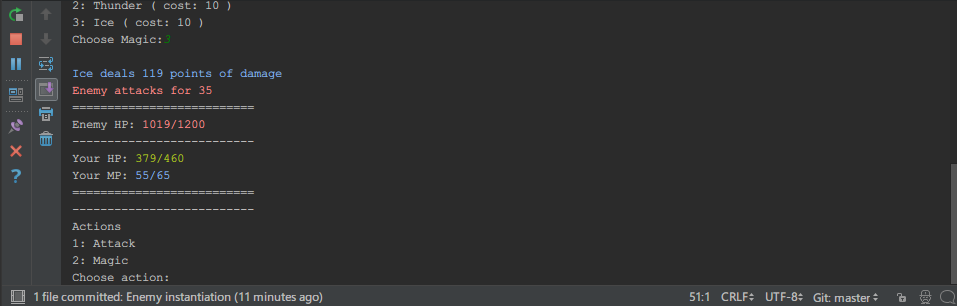
I have continued bulldozing through the course today, and my silly text RPG now has a magic system as well as a way to get a "Game Over". The application now starts straight into an enemy battle, and the played character has a limited amount of HP/MP, along with the enemy having a limited amount of HP. The application ends when either the player's hp or the enemy's hp reaches 0.


The biggest problem I'm finding is the same thing I bump into learning programming in the past: The further I go into it, the less in control I feel of the code and understanding what it does. All I have been doing mostly is copying almost verbatim the instructors code- although I do seem quick at finding typo errors when it doesn't run properly. I have also made my own changes to the program, such as making the text detailing enemy and player hp/mp stand out more, and giving different colours to the instructor (so text involving magic or MP are universally blue, for example).

I suppose these are the bugbears of learning anything unfamiliar. The thing is I know each of the systems individually and how and why they work. It's just, as a whole, I would have difficulty tracking down how or why a certain part of the code does a certain thing, without spending 30 seconds or so reading through it and remembering what each part of the code does. Still, the fact I can make little changes that work out how I want them to shows I must understand what I am coding on some level?

As usual, the code is available for study at: https://github.com/GlitchWalker/Python-RPG/