Firstly, I again need to make the point... The tutor making mistakes then correcting them mid-video is extremely frustrating. I guess it is good to see his troubleshooting process, but again it nearly broke my game... I had to rewrite at least one portion, which I put my hands up could have been due to my unorthodox changes, but equally I was coming across the same errors he did during the video so it compounded the problem quite a lot.
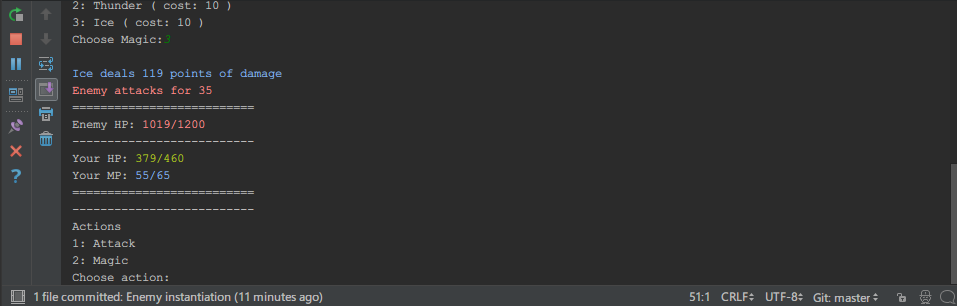
Really it sounds like I did nothing much else when I word it as putting the "finishing touches", when in reality there was quite a bulk of work. I added multiple enemies (and being able to target those multiple enemies), and also gave them the ability to attack individually and give them a rudimentary AI (they heal themselves while their health is low, otherwise that is the one ability they don't use). In my own version, I also gave them the "Pray" magic I had created myself earlier, meaning they also replenish their own MPs. It has really given the enemies some real teeth, and needing some strategy to defeat!
I had also spent maybe 45 minutes trying to see how I could recreate it as a GUI application using Kivy, but realised I didn'y actually know enough about the ins-and-outs to effectively transfer it over, with buttons and the likes, even if I can create on a whim fancy buttons (that don't actually hook up to or do anything). I decided to continue with the course instead, at least until I've finished his lessons on using the built-in Python interfaces. Maybe then I'll have a better idea of how to manipulate the code better?
As usual, my code is available to peruse and learn from at my GitHub page. The course I am learning from is Nick Germaine's "The Complete Python Course: Beginner to Advanced!" Available at StackSkills.
Showing posts with label stackskills. Show all posts
Wednesday, 27 September 2017
Python App 2: The Finishing Touches (For Now)
Labels:
adventure,
computer science,
computing,
final fantasy,
game programming,
games programming,
kivy,
pokemon,
python,
RPG,
skyrim,
stackskills,
text-based
Monday, 25 September 2017
Python App 2: Magic Class, Fixing Heals and Charge MP magic type!
It's a pretty awesome feeling when you first use what you have learned to fumble around the code and create something entirely new.
The last lesson I completed was to do with moving magic into its own class rather than the main script. And, although the tutor nearly broke his (and my) game because of a mistake he made in the video, I managed to finish it successfully. I then realised I hadn't included a "heal" function for my Player... So I hacked it together, using some of the code for dealing damage, and replacing the minus sign with a plus. I also added an "if" statement that set the hp to maxhp if the HP went above that amount (effectively capping the HP to whatever the max is.
As such, the magic code looked like this:
...I then added a line to my main code copying the black magic code but replacing it as such:
def take_damage(self, dmg):
self.hp -= dmg
if self.hp < 0:
self.hp = 0
return self.hp
def heal(self, dmg):
self.hp += dmg
if self.hp > self.maxhp:
self.hp = self.maxhp
...
...
if spell.type == "white":
player.heal(magic_dmg)
print(bcolors.OKBLUE + "\n" + spell.name + " heals for", str(magic_dmg), "HP." + bcolors.ENDC)
elif spell.type == "black":
enemy.take_damage(magic_dmg)
print(bcolors.OKBLUE + "\n" + spell.name + " attacks for", str(magic_dmg), "HP." + bcolors.ENDC)
...
Feeling pleased with my work, I decided to create a magic that charges some MP called Pray (at a 0MP cost); first I created another copy of the heal code, but tweaked it as such:
...
def charge(self, dmg):
self.mp += dmg
if self.mp > self.maxmp:
self.mp = self.maxmp
...
And then finished by adding an extra line to the main script:
...
elif spell.type == "charge":
player.charge(magic_dmg)
print(bcolors.OKBLUE + "\n" + spell.name + " charges", str(magic_dmg), "MP." + bcolors.ENDC)
...
And... Well, it worked! Which astounded me! It may be a tiny thing, but it shows me that I'm actually learning the ropes and create my own deviations rather than purely copying/pasting code! It appears I'm actually understanding it!
As usual, my code is available to peruse and learn from at my GitHub page. The course I am learning from is Nick Germaine's "The Complete Python Course: Beginner to Advanced!" Available at StackSkills.
Labels:
coding,
computing,
education,
final fantasy,
games programming,
learning,
Open source,
pokemon,
programming,
python,
RPG,
stackskills,
Technology
Sunday, 24 September 2017
Python App 2: Adding a Magic and Game Over System
I have continued bulldozing through the course today, and my silly text RPG now has a magic system as well as a way to get a "Game Over". The application now starts straight into an enemy battle, and the played character has a limited amount of HP/MP, along with the enemy having a limited amount of HP. The application ends when either the player's hp or the enemy's hp reaches 0.
The biggest problem I'm finding is the same thing I bump into learning programming in the past: The further I go into it, the less in control I feel of the code and understanding what it does. All I have been doing mostly is copying almost verbatim the instructors code- although I do seem quick at finding typo errors when it doesn't run properly. I have also made my own changes to the program, such as making the text detailing enemy and player hp/mp stand out more, and giving different colours to the instructor (so text involving magic or MP are universally blue, for example).
I suppose these are the bugbears of learning anything unfamiliar. The thing is I know each of the systems individually and how and why they work. It's just, as a whole, I would have difficulty tracking down how or why a certain part of the code does a certain thing, without spending 30 seconds or so reading through it and remembering what each part of the code does. Still, the fact I can make little changes that work out how I want them to shows I must understand what I am coding on some level?
As usual, the code is available for study at: https://github.com/GlitchWalker/Python-RPG/
The biggest problem I'm finding is the same thing I bump into learning programming in the past: The further I go into it, the less in control I feel of the code and understanding what it does. All I have been doing mostly is copying almost verbatim the instructors code- although I do seem quick at finding typo errors when it doesn't run properly. I have also made my own changes to the program, such as making the text detailing enemy and player hp/mp stand out more, and giving different colours to the instructor (so text involving magic or MP are universally blue, for example).
I suppose these are the bugbears of learning anything unfamiliar. The thing is I know each of the systems individually and how and why they work. It's just, as a whole, I would have difficulty tracking down how or why a certain part of the code does a certain thing, without spending 30 seconds or so reading through it and remembering what each part of the code does. Still, the fact I can make little changes that work out how I want them to shows I must understand what I am coding on some level?
As usual, the code is available for study at: https://github.com/GlitchWalker/Python-RPG/
Labels:
Computer Games,
computing,
education,
games programming,
gaming,
github,
programming,
python,
RPG,
scripting,
software,
stackskills,
Technology,
Text editor,
text game,
Video Games,
Web development
Saturday, 23 September 2017
Python App 2: A simple RPG
Astonishingly enough, I kept to my word. I spent some more time on the beginner to advanced Python course at Stackskills, learnt some "advanced techniques", and am now on the second project. As my title indeed suggests, its aim is to create a simple text-based RPG. The code I'm working on is of course available at my Github page although be warned that for the time being it simply includes some of the character set-up code.
I have also spent some time sprucing up the Blog, seeing as it was based on code some seven years old. First I reset to the default dynamic theme- which still looks, surprisingly, modern. My next step is to add silly little features like a Last.fm "Now Playing" widget if I am listening to music, and to add back some colour to the defaults. Gone is the snot green- I'm likely to go with either purple or red. I've also changed the font to the beautiful and easier to read Fira Sans, based on the Firefox logo font and also used in the short-lived Firefox OS.
Thursday, 21 September 2017
My First Python App: The Vulgar Calculator
So I finally pulled myself out of a bit of a slump, and spent a (relatively) substantial amount of time learning the Python programming language (for those interested, it is the "Complete Python Course: Beginner to Advanced!" available at http://stackskills.com).
I name it "The Vulgar Calculator"; which is my programming equivalent of learning all the rude words when you first learn a foreign human language.
It is available on a GitHub repository I created to put my learning projects on, aptly named Python_Learnings).I will be (hopefully) uploading more of my projects there as I continue the course- the next project is to create a text RPG, which is actually pretty exciting and right down my alley!
Hopefully I will progress through it.
I name it "The Vulgar Calculator"; which is my programming equivalent of learning all the rude words when you first learn a foreign human language.
It is available on a GitHub repository I created to put my learning projects on, aptly named Python_Learnings).I will be (hopefully) uploading more of my projects there as I continue the course- the next project is to create a text RPG, which is actually pretty exciting and right down my alley!
Hopefully I will progress through it.
Labels:
Android,
computing,
education,
github,
learning,
offensive,
programming,
python,
rude,
skills,
stackskills,
swearing,
Technology,
text game
Subscribe to:
Posts (Atom)