Showing posts with label Text editor. Show all posts

Sunday, 24 September 2017

Python App 2: Adding a Magic and Game Over System

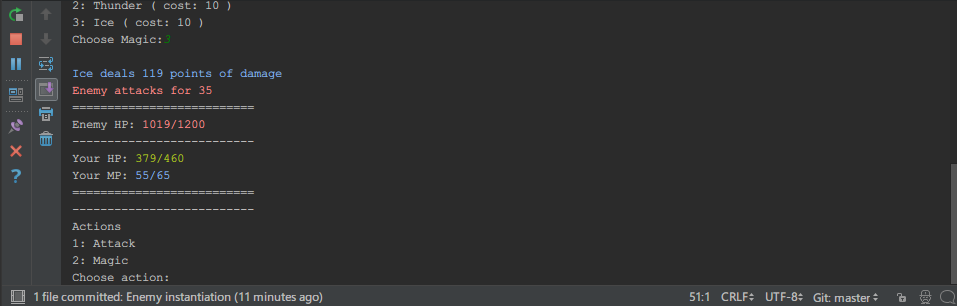
I have continued bulldozing through the course today, and my silly text RPG now has a magic system as well as a way to get a "Game Over". The application now starts straight into an enemy battle, and the played character has a limited amount of HP/MP, along with the enemy having a limited amount of HP. The application ends when either the player's hp or the enemy's hp reaches 0.


The biggest problem I'm finding is the same thing I bump into learning programming in the past: The further I go into it, the less in control I feel of the code and understanding what it does. All I have been doing mostly is copying almost verbatim the instructors code- although I do seem quick at finding typo errors when it doesn't run properly. I have also made my own changes to the program, such as making the text detailing enemy and player hp/mp stand out more, and giving different colours to the instructor (so text involving magic or MP are universally blue, for example).

I suppose these are the bugbears of learning anything unfamiliar. The thing is I know each of the systems individually and how and why they work. It's just, as a whole, I would have difficulty tracking down how or why a certain part of the code does a certain thing, without spending 30 seconds or so reading through it and remembering what each part of the code does. Still, the fact I can make little changes that work out how I want them to shows I must understand what I am coding on some level?

As usual, the code is available for study at: https://github.com/GlitchWalker/Python-RPG/

Saturday, 21 January 2012

My Weapon Of Choice Is... Blowfish

Being on Ubuntu Linux restricts me a tiny bit in which text editor I can use; either because software isn't compatible at all with it, or because it would be compatible but I need to compile it on my system, or run it under WINE. This is a good thing really, considering the fact I would like to learn the art of Webcraft using solely Open Source Software.

By default on my system I have been playing around with Gedit, usually just to copy pieces of text or code there and back that I wanted to edit. However I also gave Blowfish Editor a go, and found it was much better at auto-completing my text (not that I needed it of course- my previous lesson had taught me extremely well ;). It is nice to have the coding equivalent of a spell-check, though.

Hello World says Hello World to editor containing Hello World...


Enhanced by Zemanta