Showing posts with label Watty Design. Show all posts

Sunday, 22 January 2012

So We Meet Again, Mr Tag

A graphical depiction of a very simple css doc...
Some CSS, An Image I Thought I'd Add Even Though I Don't (Yet) Understand It. Image via Wikipedia
The following are the notes I collected in my notebook for the corresponding P2PU task. My original intention was to provide a few images of my work as well, but after it started spanning 5 or more pages in this small notebook I decided it'd be better if I didn't!

Anyway, here goes...


<DIV>

Used to group elements into blocks for styling purposes.


<BLOCK QUOTE>

Used for large quotes that may need indentation based on the style (although the style doesn't HAVE to indent it, but it'd make sense to). Use CITE to provide a URL citation. e.g:

<blockquote cite="http://gwattsdesign.blogspotcom>Loads more text would usually go here, say a paragraph or a few lines, but because I am just giving an example there is no need for me to randomly write that much off the top of my head</blockquote>

<P>

Represents a paragraph. It is used to "block" text together, and this is the most used block-level element.

<OL>

Creates an ordered list. (Can be preceded by numbering or any other character or image defined in CSS). e.g:

<ol>
   <li>line/item 1</li>
   <li>line/item2</li>
</ol>

<UL>

Similar to <ol>, bu creates a list with no numerical ordering, but just bullet points (or whatever is defined in CSS) e.g:

<ul>
   <li>line/item</li>
   <li>another line/item</li>
</ul>

<LI>

Stands for List Item. Should only be used in a list with <ol> or <ul>

<NAV>

Navigation element; contains links used to navigate the website. e.g:

<nav>
   <ul>
      <li>Home</li>
      <li>Away</li>
      <li>About</li>
      <li>Links</li>
   </ul>
</nav>

<MENU>

Creates an unordered list. The difference is whereas <ul> solely displays items, <menu> acts as an interactive menu with items that are activated or interactive in some way (like in a window's menubar). It can also contain nested <menu>'s, or menus within menus (which presumably would display on mouse-over). e.g.:

<menu type="toolbar">
   <li>
      <menu label="file">
         <button type="button" onclick="new()">New...</button>
         <button type="button" onclick="save()">Save...</button>
      </menu>
   </li>
   <li>
      <menu label="empty">
      </menu>
   </li>
</menu>

<SPAN>

Used for styling purposes. Similar to <div>, but is used in-line within a block, rather than acting as a block itself. (A little like when you put text in italics or bold in word processing, it doesn't necessarily act on the whole block/paragraph but only on a word, a few words or a line...?) e.g.:

<p>this <span>here</span> has just used the span tag</p>

<TIME>

Represents the time and/or date of an event, whether external (like a concert) or part of the website (like the creation of an article, or update of a page). It doesn't magically do anything on its own, but it is machine readable (using, for example, something like Google Calendar or a Feed Reader) so an application can use the date to update a calendar or order news stories. Information can be internal to the tag, or surrounded by the tag, depending on whether you want to the user to see the extra information or not respectively as part of the page.  e.g.:

<p>Let's meet up at <time>19:00</time>
<article>
   <p>This here article was made on <time pubdate>2011-01-02</time></p>
</article>
<p>The comedy show took place on <time datetime="2001-05-15 17:00">May 15 2001</time>
<Q>
Indicates the included text is a quote. e.g.
<p>Gary said <q>Gee whiz, that is so funny!</q>.</p>

<IMG>

Represents an image. e.g.:

<img src="a_pic.png" height="800" width="600" alt="What a pic!/>

Based on the P2P University activity at  http://p2pu.org/en/groups/webmaking-101-html-hunting-in-the-world-around-you/content/some-tags-for-you-to-meet/
Enhanced by Zemanta

Saturday, 21 January 2012

%$@&! P2PU Is Down!

Just as I was about to start work on the next P2PU course, I go on it and get a message that the site is down for maintenance! I would have thought this would be one of the worst times to do (scheduled) maintenance, as not only is it prime-time for European web browsing but I would have thought peak time isn't too far off in the US too...

Oh well, I think it's time for a Thomas The Tank Engine Youtube Poop.... (most likely NSFW)


Enhanced by Zemanta

My Weapon Of Choice Is... Blowfish

Being on Ubuntu Linux restricts me a tiny bit in which text editor I can use; either because software isn't compatible at all with it, or because it would be compatible but I need to compile it on my system, or run it under WINE. This is a good thing really, considering the fact I would like to learn the art of Webcraft using solely Open Source Software.

By default on my system I have been playing around with Gedit, usually just to copy pieces of text or code there and back that I wanted to edit. However I also gave Blowfish Editor a go, and found it was much better at auto-completing my text (not that I needed it of course- my previous lesson had taught me extremely well ;). It is nice to have the coding equivalent of a spell-check, though.

Hello World says Hello World to editor containing Hello World...


Enhanced by Zemanta

Friday, 20 January 2012

A New Blog, An New Attempt At Design

While watching the events surrounding the SOPA bill, and wanting to get into political blogging of some kind, I decided to create a new blog.

Not one to be a bit un-controversial, I decided to create a logo and caption based on that of the Green Party and the Pirate Party, as they are both parties I support and as I believe they are both compatible to create a kind of mega eco-tech-savvy chimera of some kind.


Anyway, there are my results. I will be getting back into the HTML course shortly as well.
Enhanced by Zemanta

Friday, 2 December 2011

Hello World Success!

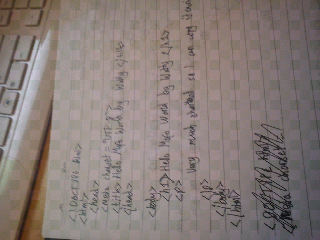
Here is my final go at the Hello World activity. I managed to do it off top of my head after about 6 tries last night and this evening! Only issues are I didn't do the indentation properly for the <meta> and <title> tags, but as this is merely superficial and wouldn't affect the final outcome of rendering the page, I thought I'd let myself off for it. Although it would make it slightly confusing if anyone else was working on my page... but as it's just me, I can handle it!


Is it just me or are my images on Blogger full of squares, for some reason?

Based on activity from P2PU Webcraft School, at http://p2pu.org/en/groups/webmaking-101-writing-html-by-hand/content/hello-world/
Enhanced by Zemanta

Hello World First Attempt

My first attempt of "Hello World" before I gave up and went to bed. Will do it again tomorrow, however.


Task from P2P University; http://p2pu.org/en/groups/webmaking-101-writing-html-by-hand/content/hello-world/
Enhanced by Zemanta

Just a Box. I mean, test.


Just a test, in order to complete my first task on P2PU. The task is available at
And hi, everyone!
Enhanced by Zemanta